
Guitar Pro
For guitarists
- Guitar Pro 3 to 8: .gp3, .gp4, .gp5, .gpx and .gp
- Pick the track for each hand
- The other instruments of the song play along
Learn songs on piano
Import a Guitar Pro or MusicXML file and play it with falling notes, at your own speed. Connect your piano over Bluetooth and the lesson waits for you.

Open web app (no sound on the web)
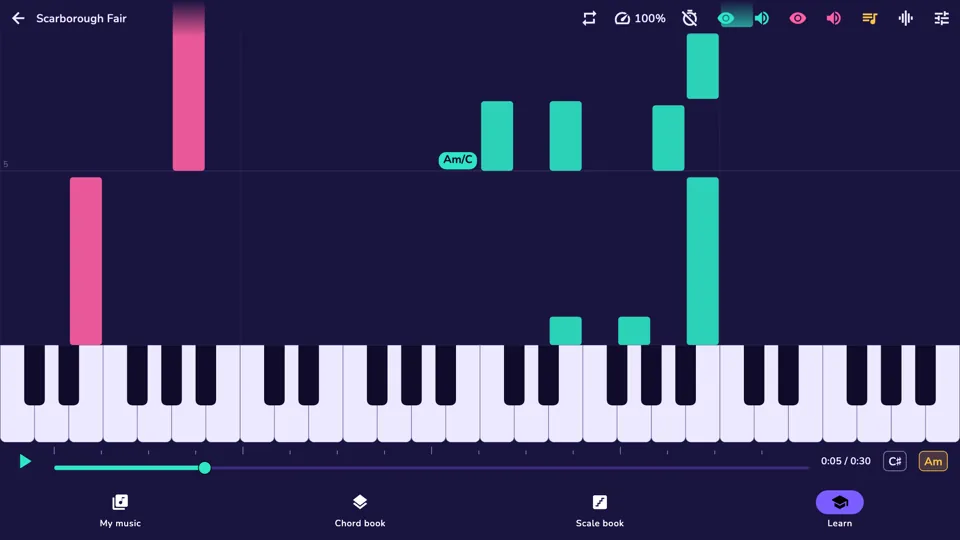
Demo, no sound: notes fall onto a piano keyboard and light up each key as they reach it, the right hand in teal and the left hand in pink. It loops the opening of Scarborough Fair, a traditional song.
The two most common ways to share a song. Whichever you have, the lesson and the player are the same.
For guitarists
For pianists and everyone else
Sign in, open Learn, and tap Import Guitar Pro or MusicXML. You can also open a file in JamWise straight from Files, mail or your downloads.
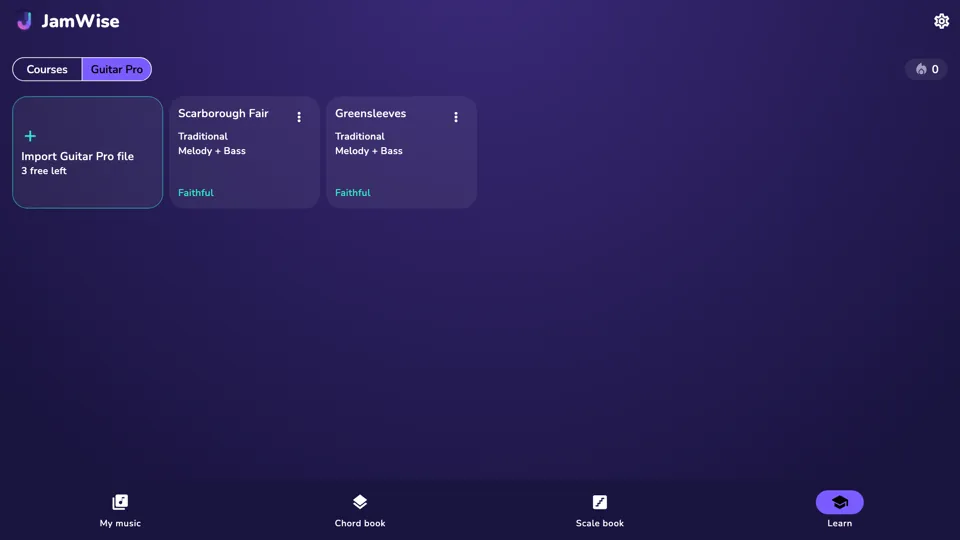
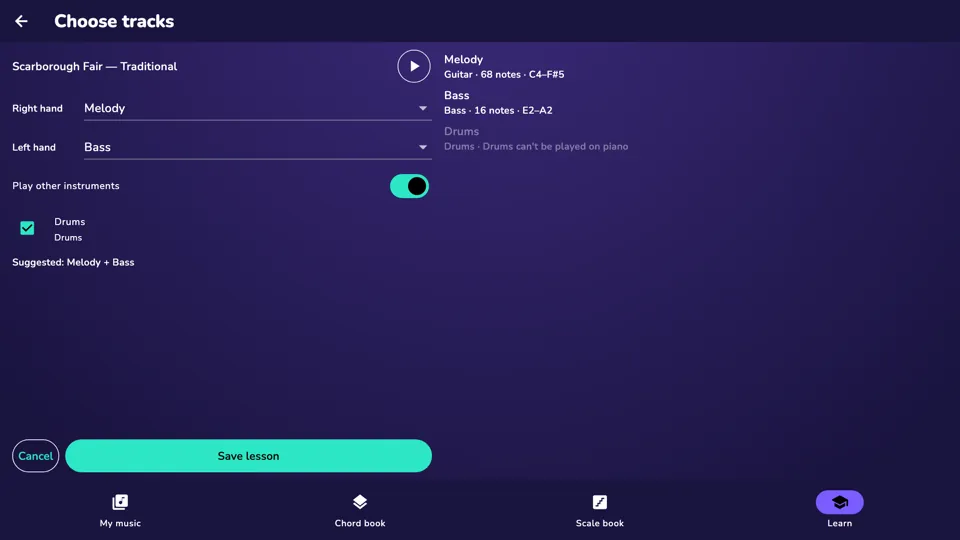
Confirm you have the right to use the file, then pick the track for your right hand and, if you like, one for your left. The other instruments can play along. Preview 10 seconds, then save the lesson.
Notes fall onto the keys and you play them at your own speed, on the screen or on your own piano.
Works with Guitar Pro 3 to 8 (.gp3, .gp4, .gp5, .gpx, .gp) and MusicXML (.musicxml, .xml, .mxl).
With a Bluetooth MIDI piano
Connect a digital piano or keyboard that supports Bluetooth MIDI. JamWise stops at each note until you play it, then moves on.
Open Settings, tap Connect instrument and pick your piano. JamWise remembers it and reconnects quietly next time.
The lesson holds at any note you haven't played and continues when the right keys go down. No rush, no falling behind.
Play the right hand, the left, or both. The hand you skip plays itself, so you hear the whole song.
A wrong key shows on the on-screen keyboard right away, so you find the right one without stopping.
A chord counts when all of its keys are down, so a rolled chord doesn't slip past.
JamWise doesn't double what you play, so you hear your own piano and nothing else on top of it.
Playing on your piano needs a piano or keyboard with Bluetooth MIDI, JamWise on iPhone or iPad, and Plus. It is practice, not a test: there are no scores or results.
Set a speed you can keep up with, then bring it back up as the part gets easier.
Mark a few bars and play them again and again until they sit under your fingers.
Hide or mute either hand and practise the other one on its own.
A count-in before the notes start, so you come in on time.
Turn on note names on the keys and chord names as they come.
The other instruments of the song play with you, each with its own volume. Their sounds are a one-time download.
JamWise reads the file on your phone or tablet. The file is never uploaded.
Before an import you confirm you have the right to use the file. Import only files that are yours or that you have the right to use.
The lesson made from the file is private to your account and syncs to your other devices. The file itself stays where it is.
Free
$2.99 a month or $19.99 a year
Guitar Pro 3 to 8 (.gp3, .gp4, .gp5, .gpx, .gp) and MusicXML (.musicxml, .xml, .mxl). Files from MuseScore (.mscz) don't open directly: in MuseScore, choose File, Export, then MusicXML.
Export one from MuseScore, Sibelius, Finale or Dorico, or download one from a score library such as OpenScore or IMSLP. Import only files you have the right to use.
Only with files you have the right to use. JamWise doesn't download songs: you import a file that's already on your device and confirm you have the right to use it.
No. Without one, notes fall onto the on-screen keyboard and you play them on any piano or keyboard. A MIDI piano adds the lesson that waits for you.
Digital pianos and keyboards that support Bluetooth MIDI, on iPhone and iPad. Connecting a piano isn't available on Android or the web yet, and JamWise doesn't use USB MIDI.
No. The lesson waits for you and shows right and wrong keys, and that's all. It is practice, with no scores, results or stats.
It is part of JamWise Plus, with no free tries. Importing songs gives you 5 free imports first.
No. JamWise shows falling notes on a keyboard, not the printed score. Ornaments and pedalling in a MusicXML file are ignored.
Drums can't be played on the piano, so you can't pick them for either hand. They can still play along with the rest of the band.
No. Lessons work in the web app, but without sound. Sound is in the iPhone and iPad app.
No. The file is read on your device and never uploaded. Only the lesson made from it syncs with your account, and it stays private.
Yes, and it works best on a tablet. On a phone, play in landscape.
Install JamWise, open Learn, and import a Guitar Pro or MusicXML file you have the right to use.
Open web app (no sound on the web)